


The transaction is the easy part
A few years ago, accepting a contactless donation in person felt like an edge. Today it's just the norm. Card readers can take a tap donation. A tap-to-pay app on someone's phone can take a tap donation. More tools are adding the same payment features every quarter, and that is genuinely good for nonprofits.
But taking the payment was never the hard part.
The hard part starts after you set the device down. Is it still online? Is it charged? Is it running the right screen for today's event, or is it still on last month's campaign? Did it update overnight, or is it stuck on a version that no longer works with the reader? Who notices when it goes dark in the corner of the lobby, and how long does it sit there collecting nothing before anyone finds out?
That's the real question behind in-person giving. Not "can this thing take a donation," but "what happens around the donation." When every tool can take a tap, what sets them apart is everything else: the experience the donor has at the device, the range of things one device can actually do, and who keeps a whole fleet of them running with confidence.
One Kiosk, more than a donation
Here's the first thing that gets lost when the whole conversation is about payments. A card reader takes one amount. A tap-to-pay app runs one flow. A donation form is a donation form. Each of them does a single thing.
A Kind Kiosk starts with a main menu, and that changes what the device is. Instead of one hard-coded action, the home screen is a front door. You pick a standard or full-background layout and add the buttons that fit your organization. From that one screen a supporter can:
- Give, once or recurring, to the fund they care about, with suggested amounts and the choice to cover the processing fee so the full gift reaches you.
- Become a member on the spot, through a commerce workflow.
- Buy something from the gift shop or the event table, with product variants for size and color, live inventory that flips to "Sold Out" on its own, and promo codes at checkout.
- Sign up for your mailing list or answer a few questions, through an informational workflow.
- Learn about a specific campaign or fund before deciding to give.
And the giving itself is a designed experience, not a bare form. It takes Apple Pay, Google Pay, cards, and Donor Advised Funds. It sends a receipt you built, with a separate version for anonymous donors if you want one. It marks the gift with a bit of confetti, and it can feed a live leaderboard so the whole room watches the total climb in real time.
That breadth matters for a simple reason. The same device you set out to collect donations can also sell your memberships, move your merchandise, and grow your list. One tool, several jobs, one moment with the supporter standing in front of it. A single-purpose reader or a one-flow app cannot do that, no matter how many payment features get added later.
What the alternatives leave on your desk
Most of the options on the market solve the payment and hand you the rest.
Donorbox Live™ Kiosk gives you software to run on a tablet you buy, set up, and maintain yourself. That means you are the one sourcing the hardware, keeping the app updated, locking down the screen so a visitor cannot wander off into Safari, and troubleshooting it when something drifts. The donation form is handled. The device it lives on is your problem.
A regular POS or card reader was built to ring up a coffee, not to sit unattended in a museum lobby taking gifts from strangers. You own a reader, but you do not own a managed giving experience. Updates, security, screen lockdown, and matching every swipe back to the right donor and fund all land back on staff.
A tap-to-pay donation app runs on a personal phone. The tap itself is secure, but the device is not managed. You cannot see it remotely, you cannot update it on your schedule, you cannot lock it to one task, and you cannot wipe it if it walks off. Whether it is charged and present on Saturday morning depends on whoever owns the device remembering to bring it.
In every case, the tool took the transaction and quietly handed you a second job: babysitting the hardware. For a lot of organizations, that job falls on one already-stretched staff member, or it drags in an IT team you may not even have. Neither of those is what you signed up for when you wanted to raise more in person.
Managing a fleet of Kiosks, not just the moment
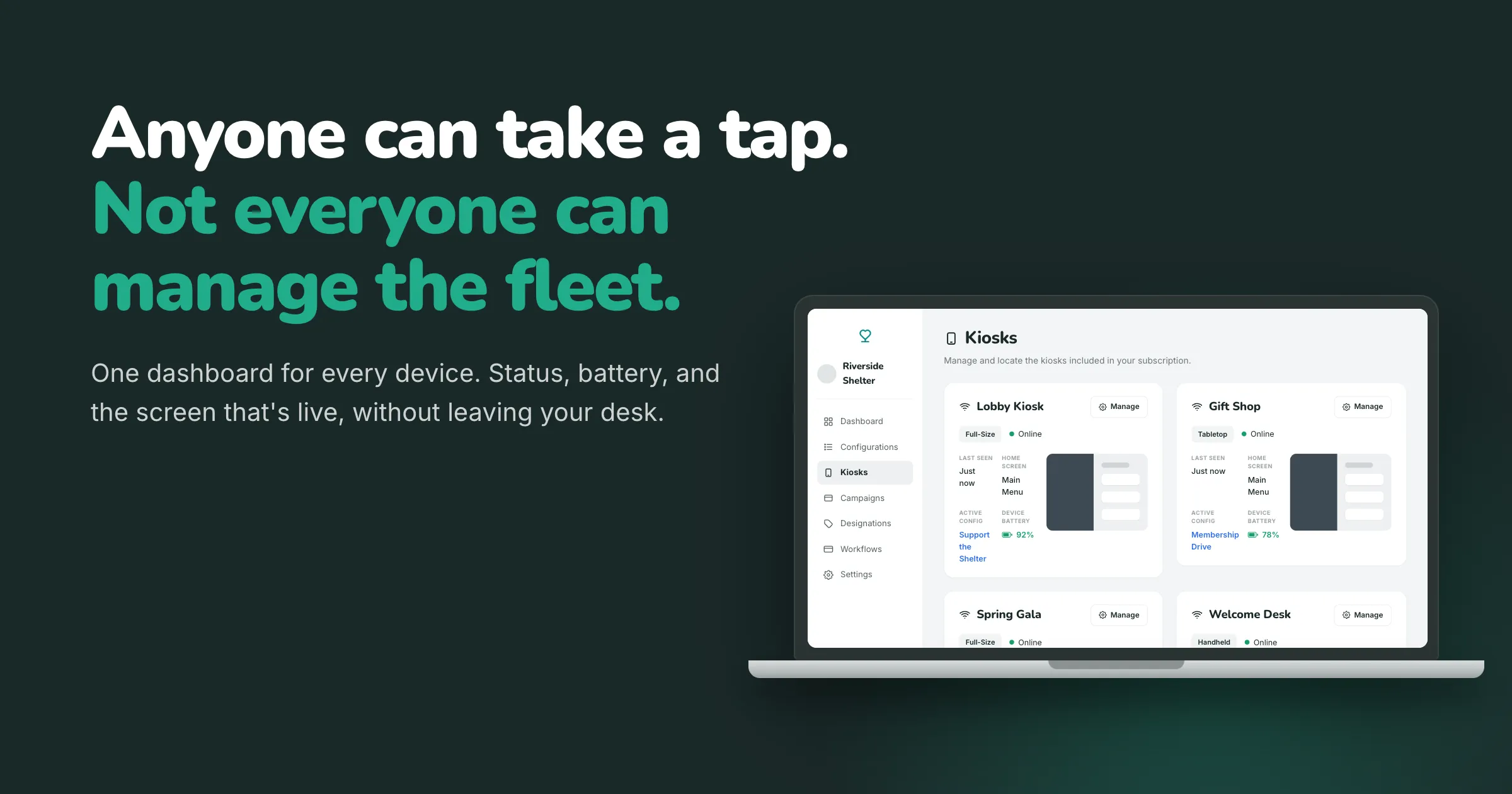
Donation Kiosk fleet management is the ability to monitor and control every giving device from one dashboard: whether each Kiosk is online, its battery and connectivity, its software version, what is on the screen, and which campaign it is running, plus remote updates and low-battery alerts, without visiting the device in person.
This is where Kind Kiosk is built differently, and it's the gap competitors cannot close by adding more payment features.
Every part of the Kiosk is sourced and pre-configured before it ships, so it arrives ready for a quick setup. Cellular connectivity is included, so you're not depending on wifi, using a hotspot, or buying another cellular plan. We manage the software and handle updates remotely. You are not handed parts to source, configure, and patch. You are handed a system that is managed for you.
You can see and steer that whole system from one dashboard, without touching a single device in person. From your Dashboard you can watch your Kiosks at a glance:
- Whether each Kiosk is online right now, and when it was last seen, so a device going quiet is something you notice in minutes, not weeks.
- Battery levels for both the device and the card reader, plus automatic email alerts when either one runs low, so a dying tablet or reader is something you hear about before it goes dark, not after.
- Connectivity at a glance, wifi or cellular, per device.
- The exact app version running on each Kiosk, so your whole fleet stays current instead of scattered across old versions.
- A recent screenshot of what is on the screen right now, so you can confirm the right campaign is live without walking across the building or driving to another site.
- Which configuration each Kiosk is running, and the ability to change it remotely. Swap a lobby Kiosk over to a gala layout from your desk, then swap it back Monday morning.
- Kiosk Mode lockdown status, so you know the device is pinned to giving and can't be used to browse the web or open other apps. Because it's managed, you turn Kiosk Mode on or off from the dashboard, the app locks itself the moment it launches, and it comes back on its own if the device restarts, with no passcode to set or buttons to triple-click on the device itself.
That is fleet management. Not a nicer donation form, but real control over a group of devices that might be spread across a lobby, a gift shop, three event tables, and a partner site on the other side of town. One person can run all of it from a laptop.
And because each Kiosk carries its own configuration, no two have to be alike. The lobby Kiosk can run general giving, the gift shop Kiosk can sell memberships, and the one at Saturday's gala can run that night's campaign, all at once, all from the same account. A fleet does not have to mean one setup copied onto every screen. It can mean the right setup on each one, chosen from your desk.
And you are not the only one who can see it. When something needs attention, the Kind Kiosk team can look at the same view, check the device remotely, and often sort it out before anyone drives to the site. That is what makes support quick. We are not asking you to describe a frozen screen over the phone; we can see it, push an update, or swap the configuration from our end. For an organization with no IT team, the people who help keep your Kiosks running include us.
Here is how that lands against the alternatives, looking only at what happens to the device after the tap:
| After the tap | Kind Kiosk | Donorbox Live™ Kiosk | POS / card reader | Tap-to-pay app |
|---|---|---|---|---|
| Remote fleet dashboard | Yes | No | No | No |
| Managed software updates | Yes, handled remotely | You update the app | You or your vendor | Up to the phone's owner |
| Connectivity included | Yes | Your network or purchased cellular plan | Your network | The phone's data |
| Low-battery email alerts | Yes | No | No | No |
| Locked to giving | Yes, managed, auto-relocks on restart | Manual iOS setup on each device | No | No |
| Change the on-screen campaign remotely | Yes | No | No | No |
| Support can see and fix the device remotely | Yes | App support only | No | No |
Why this is really a staffing story
Fleet management sounds like an IT feature. It is actually a staffing feature.
When the device manages itself and reports back to one dashboard, the person responsible for fundraising does not have to become the person responsible for hardware. They don't walk the floor checking screens. They don't chase down a frozen tablet during an event. They don't file an IT ticket to push an update, or wait on a volunteer to remember to charge a phone. They open one page, see that everything is green, and get back to the work that raises money.
For a small organization with no IT team, that is the difference between using Kiosks and not being able to. For a larger one, it is the difference between one confident staff member covering a dozen devices and a standing headache that pulls in three departments.
Competitors will keep adding payment features, and that's fine. Taps are a solved problem. The thing that decides whether in-person giving is worth it a year from now is not whether the device can take a donation. It's whether keeping the devices running quietly takes care of itself, or takes over someone's week.
Common questions
Can you manage donation Kiosks remotely?
Yes. With Kind Kiosk you manage the whole fleet from one dashboard. You can see whether each Kiosk is online, check its battery and connectivity, confirm what is on screen, push a new campaign, and get an email when a device or reader runs low, all without being in the room.
What is the difference between a donation Kiosk and a tap-to-pay donation app?
A tap-to-pay app runs on a personal phone that no one manages: you cannot update it, lock it, or see it remotely. A donation Kiosk is org-owned, managed hardware with remote updates, included cellular, and a dashboard for the whole fleet, so it stays charged, current, and on the right screen.
Can one person manage multiple donation Kiosks?
Yes. Because every Kiosk reports to one dashboard and updates are handled remotely, a single staff member can run a dozen devices across a lobby, a gift shop, event tables, and other sites from a laptop, without walking the floor or pulling in an IT team.
What happens if a Kiosk has a problem during an event?
Because your fleet reports to a shared dashboard, the Kind Kiosk team can see the issue and fix it remotely, whether that means pushing an update, reloading the configuration, or checking connectivity. Support reaches you by phone, text, chat, or email, so a hiccup during an event is not yours to solve alone.
See it for yourself
If you are weighing a donation Kiosk against a tap-to-pay app, a card reader, or software you would run on your own tablet, ask the two questions that outlast the demo. What can a supporter actually do at the device? And after the tap, who manages it?
We would love to show you what managing a fleet from one dashboard looks like. Book an intro call and we will walk you through it with your setup in mind.