
elevates in-person fundraising.
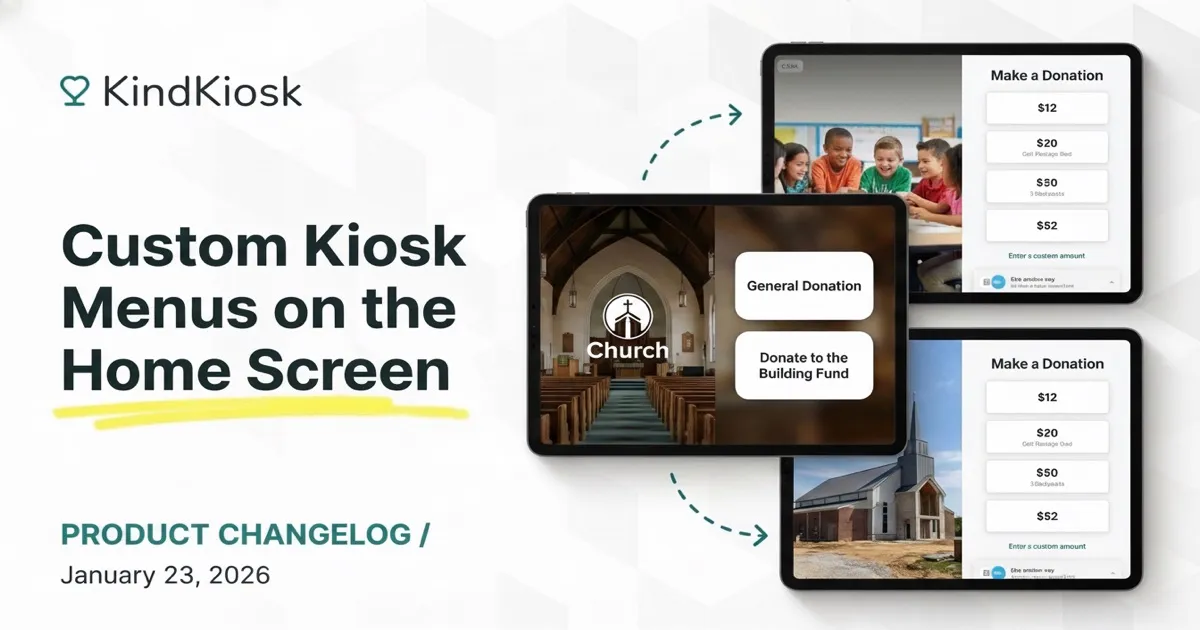
When multiple workflows are enabled for a configuration, we've always shown a main menu on the kiosk. We're excited to take this feature significantly further by giving organizations greater control over the menu experience.
Choose from our standard or full background layouts. Full background layouts allow you to upload an image for the left panel of the main menu, while our standard layout shows your organization's logo and customizable text.
Previously, you were limited to a single donation workflow. With the new main menu, you can have as many as you want. Each one with different suggested amounts, receipt settings, or custom questions.
It's now possible to set up a donation flow for a building fund vs a general donation. Donors can choose which one to use from the main menu.
You're not limited to Donation workflows. If you have Custom Workflows, those can be launched from the main menu as well.
You can add, remove, edit, and reorder menu buttons.
We recommend using 2-4 buttons, but support up to 10. The right panel of the menu is scrollable when you have more than 4 main menu buttons.
An example of the menu builder
The main Menu on the Kiosk app
Subscribe to get notified when we ship new features and improvements.
Max of two emails per month.
You're subscribed!