
elevates in-person fundraising.
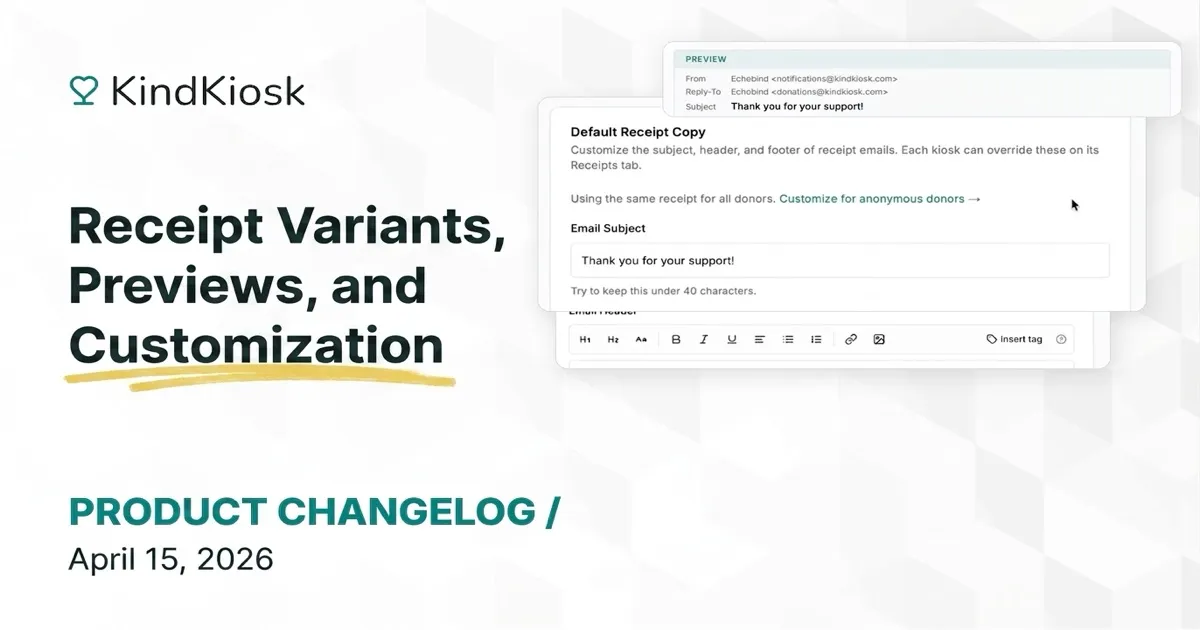
Until now, every donor who received a receipt got the same email, whether they left their name or tapped and walked away. That's a missed opportunity. A donor who tells you their name and email deserves a personal thank-you. A guest who taps their card without identifying themselves needs something different: shorter, warmer, and without awkward empty merge tags.
Now you can write both.
Click Customize for anonymous donors and you'll get a second set of fields (subject, header, and footer) exclusively for donors who give without entering contact information. Your default receipt stays exactly how it is. The anonymous variant is a clean slate where you can write copy that fits a quick, unnamed gift.
Think of it this way: your known-donor receipt might say "Thank you, [DONOR_NAME]! Here's your receipt for [DESIGNATION_NAME]." Your anonymous variant can skip the name entirely and use the receipt as a conversion point: "Thank you for your generous gift. Want to see the impact? Follow along at our website" with a link to your newsletter signup, an upcoming event, or a page that turns a one-time tap into an ongoing relationship.
Switch between variants with a dropdown. Don't need separate copy? Use the same receipt for everyone, just like before.
A live preview sits alongside the editor and updates as you type. Toggle between "Known donor" and "Anonymous donor" to see how each variant reads, which merge tags fill in, and which are cleanly removed.
The preview also shows From, Reply-To, and Subject so you can catch issues before they ever reach a donor's inbox. When you're happy with it, hit Send test email to deliver a real receipt to yourself and see how it looks in Gmail, Outlook, or on your phone.
Plain text fields are gone. The new editor gives you bold, italic, underline, headings, bullet and numbered lists, text alignment, links, inline images, and small text for fine print. Upload images directly and they're hosted on our CDN and rendered inline.
Merge tags like [DONOR_NAME], [AMOUNT], and [DESIGNATION_NAME] still work. New: add inline fallbacks with the pipe syntax. [DONOR_NAME|Friend] renders "Friend" when the name isn't available, so your copy always reads naturally.
Configure your default receipt copy in Settings → Email and it applies everywhere. If a specific configuration needs different copy, like a gala configuration that thanks guests for attending, override it on that configuration's Receipts tab. Each configuration can also have its own anonymous variant. Reset to the org default at any time with one click.
Subscribe to get notified when we ship new features and improvements.
Max of two emails per month.
You're subscribed!