

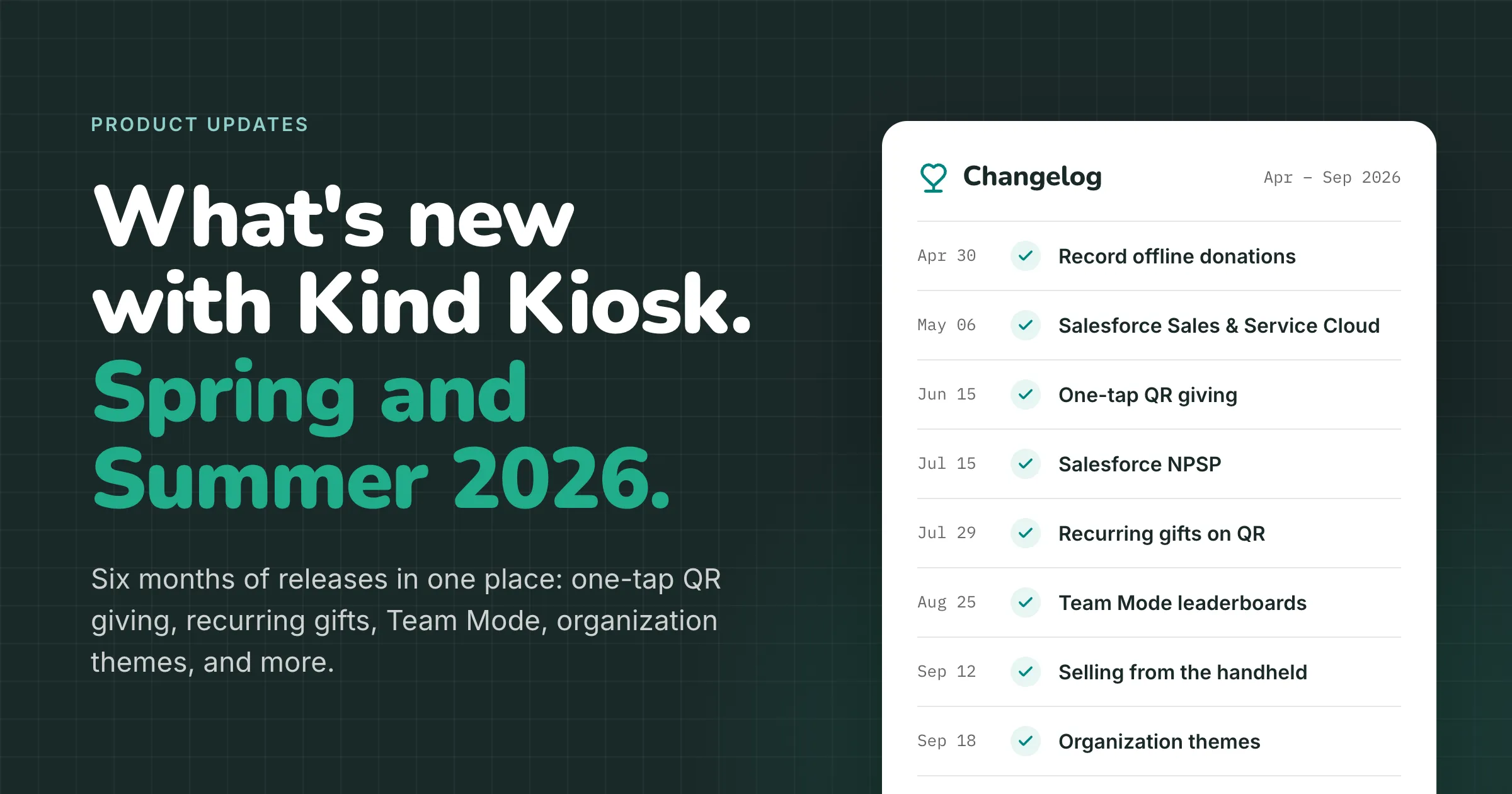
If you follow our changelog, you have seen a steady stream of releases since April: a new integration one week, a new setting the next, a fix you may never have noticed. Each one made sense on its own. But a list of releases tells you what changed, not where a product is heading.
So rather than recap each month as it ended, we waited and looked at April through September all at once. Read together, six months of work tells a clearer story than any single release does, and that story is about how in-person giving actually happens: in a crowded room, in a few distracted seconds, at organizations that each do things a little differently.
Most of what we shipped comes back to three ideas:
- Giving should take less effort than deciding to give. Once someone wants to support you, nothing should slow them down.
- A kiosk should do more than take donations. Events have merch tables, guestbooks, and checks at the registration desk, and all of it belongs in one place.
- The choices are yours, not ours. How you ask for money, what you ask donors for, and how it all looks should reflect your organization, not our defaults.
Less effort than deciding to give
Deciding to give takes a second. The speaker at your gala finishes a story, a docent points out what a donation made possible, a kid tugs a parent toward the kiosk. What happens in the next minute decides whether that second turns into a gift, and this year we spent a lot of time on that minute.
At the kiosk, the slowest part has always been typing. Email fields now suggest @gmail.com, @yahoo.com, and @hotmail.com as tappable shortcuts after a few characters, and autocorrect is off on every kiosk text field, so a donor's last name no longer gets quietly rewritten into a different word.
On a phone, the first screen is the whole game. When someone scans the QR code on your lobby sign or table tent, giving now leads with Apple Pay and Google Pay, so for most people it is one tap on one screen instead of a form to fill out on a small keyboard.
The moment right after a first gift is also the best time to ask about a second one. The handheld can now invite a one-time donor to give monthly on the spot, and QR and Donate Button giving offer the same choice. Donors pick how long to keep it going, and six months is a much easier yes than forever.
Sometimes the minute runs out anyway. A child runs off across the lobby, or the program starts mid-gift. If the donor already entered their email, Kind Kiosk now sends a friendly follow-up with a button that opens the gift right where they left it. You write the email, and merge tags fill in their name, the amount, and the fund they chose.
More than a donation box
Picture a gala. There is a merch table in the corner, a registration desk where someone hands over a check, a guestbook by the door, and a kiosk for donations. Until recently, only one of those ran through Kind Kiosk. This year we went after the rest of the room.
Start with the merch table. The handheld now runs commerce workflows, so staff can sell shirts, tickets, and concessions anywhere in the room with the same tap-to-pay checkout as the tablet. Right before the card is charged, the handheld checks stock one more time, so nobody pays for the last medium that sold a minute ago. Promo codes, minimum purchases, and receipts by email all come along.
Then the guestbook. You can set an informational workflow as a kiosk's home screen, so a guestbook, pledge form, or volunteer sign-in is the first thing people see, with no menu in front of it. When someone finishes, or wanders off mid-form, the kiosk resets itself with a clean page for the next person. It works on tablet kiosks and the handheld, and every view shows up in your dashboard.
Then the check at the registration desk. Gifts that never touch a kiosk can now be recorded right in your dashboard: cash at the door, a check at a pop-up table, a pledge card from a major donor. Offline gifts count toward your live leaderboard, and they skip CRM sync on purpose, so you won't end up with duplicates of gifts your team already entered.
Which brings us to the big screen, and the biggest release of the summer. Team Mode turns a campaign into a friendly competition. Your leaderboard becomes ranked team cards with live totals and a crown for each team's leader, on its own link you can put up on a projector. Every fundraiser gets a personal donate page, and every gift rolls up from person to team to campaign automatically.
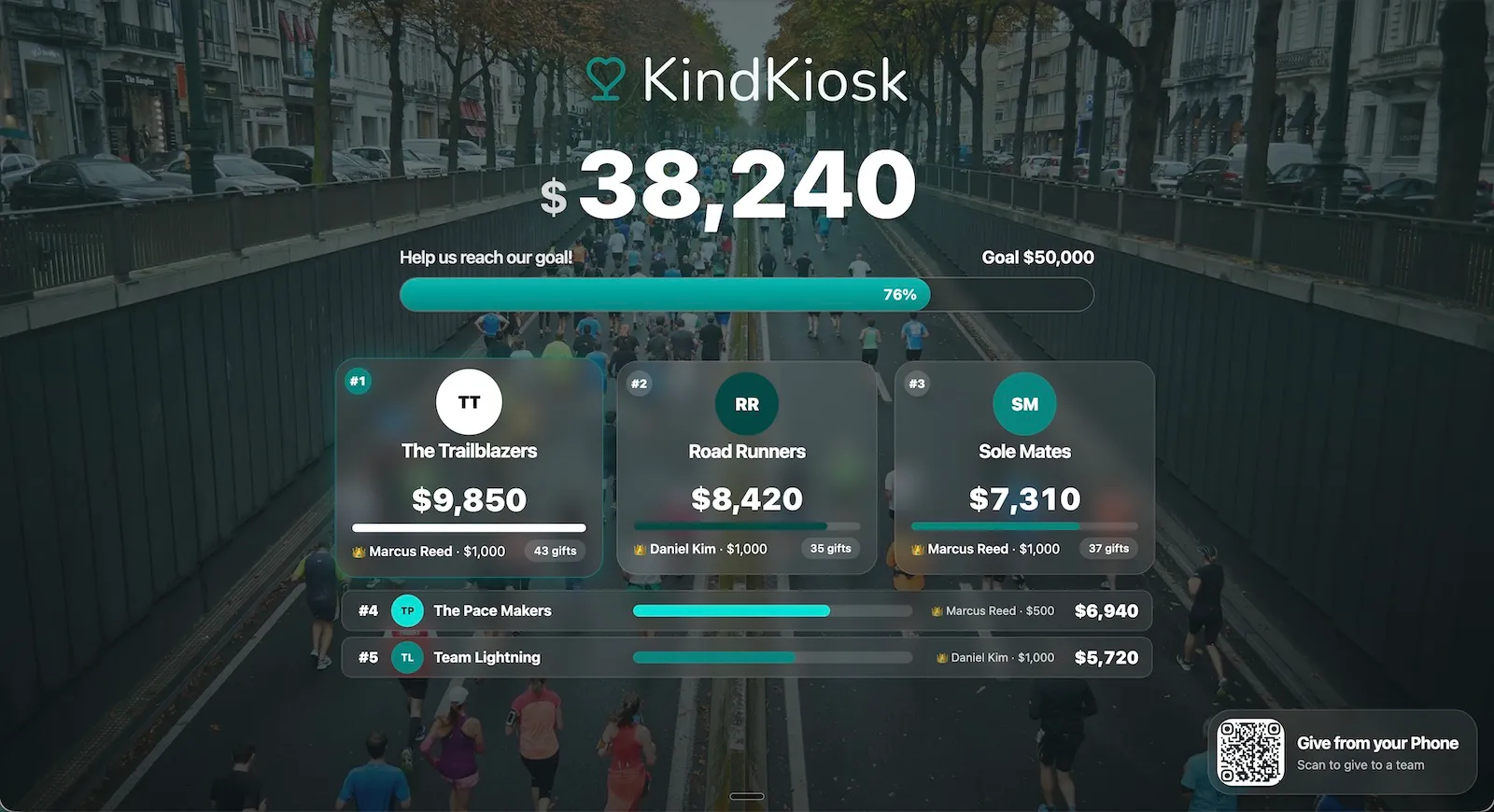
On the kiosk, Team Mode shows campaign progress and a podium for the top three. Donors tap a team or a specific fundraiser and give, and the gift is credited correctly even if it started from the QR code on screen. People who would not give for a cause will give for their team, and because this runs on the kiosk, it reaches everyone standing in your building, not only the people already on your email list.
Your call, not ours
A lot of this year's work was handing over decisions we used to make for you. Some of them are small, but each one is a place where a reasonable organization might want something different from our default.
Take processing fees. The cover-fees box on donations always used to start checked. Some organizations like that; others would rather donors opt in. You can now choose which way it starts for each configuration, and the choice carries across kiosks, handhelds, and the QR code donation page. Donors can still flip it either way. The same option now works on product sales, too.
Or take contact info. For a five dollar gift, you probably don't need a name and email. For a five hundred dollar gift, you almost certainly do. You can now set the amount where contact info becomes required. Below it, donors fly through as quickly as ever. At or above it, the kiosk asks for what you need for thank-you notes, receipts, and tax letters.
Even the numbers in your reports were our call. Is a $52.16 gift with fees covered a $52.16 donation or a $50 one? Every finance team has an opinion, and now you can choose gross or net. Your dashboard and CRM integrations both follow the setting, so the totals in your reports and the amounts on your donor records tell the same story. Donor receipts always show the full amount paid.
The same goes for how things look. Organization themes let you pick a primary color once and see it on every kiosk, handheld, and QR donation page: the donate buttons, the selected amounts, the one-time or monthly toggle. Button text switches between white and dark on its own so it stays readable, and any configuration can use its own color for a campaign with a different look.
And how things sound. You can now write separate receipts for known and anonymous donors and preview each before it goes out. Enterprise organizations can also send receipts from their own domain, so the email lands with your name on it.
Where your team already works
A gift isn't really finished until it's in your CRM. In May, Kind Kiosk started syncing to Salesforce Sales Cloud and Service Cloud, and in July we added native Nonprofit Success Pack support, with gifts arriving as Opportunities with GAU Allocations and donors as Household Contacts.
Raiser's Edge got smarter donor matching that attaches gifts to the right record more often and flags a possible duplicate for review instead of guessing.
And a little peace of mind
Kiosks live out in the world: lobbies, events, partner locations. Occasionally one walks off. You can now report a kiosk lost or stolen with one click in the dashboard. Payments stop right away, the device is signed out, and supervised iPads lock to a full-screen message with our support number, even after a restart. If it turns up, our team can restore it just as quickly.
On the account side, you can now see who on your team has two-factor authentication turned on, and require it for everyone.
What is next
There were dozens of smaller fixes along the way, and they are all in the changelog if you like that sort of thing. We will keep writing these roundups.
If there is something you wish Kind Kiosk did, tell us.